
TFT 2.4 touch screen sd card slot
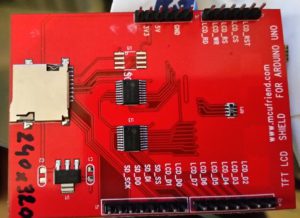
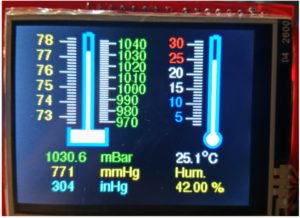
Achterzijde Voorzijde Barometer (Voorbeeld 5)
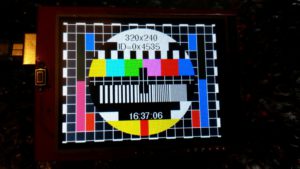
Testbeeld (voorbeeld 1)
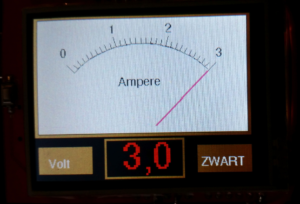
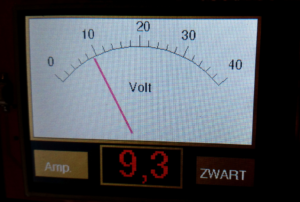
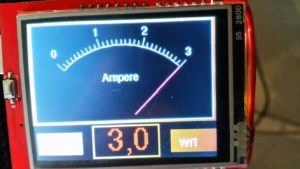
Voorbeeld 6 Ampére – Voltmeter omschakelbaar witte en zwarte achtergrond
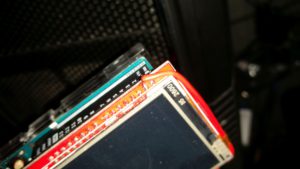
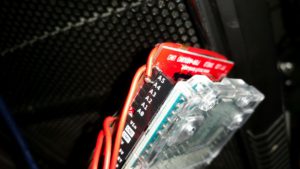
Er zijn veel verschillende drives voor dit type display
Deze demo werkt alle andere niet aan de praat kunnen krijgen.
#include <UTFTGLUE.h>
#include <Adafruit_GFX.h>
Dit gevonden op https://forum.arduino.cc/index.php?topic=366304.0
Voorbeeld 1
// Voorbeeld programma van het testbeeld
* generate testcard similar to BMP
*/
#include <Adafruit_GFX.h>
#if defined(_GFXFONT_H_) //are we using the new library?
#include <Fonts/FreeSans9pt7b.h>
#define ADJ_BASELINE 11 //new fonts setCursor to bottom of letter
#else
#define ADJ_BASELINE 0 //legacy setCursor to top of letter
#endif
#include <MCUFRIEND_kbv.h>
MCUFRIEND_kbv tft;
#define BLACK 0x0000
#define BLUE 0x001F
#define RED 0xF800
#define GREEN 0x07E0
#define CYAN 0x07FF
#define MAGENTA 0xF81F
#define YELLOW 0xFFE0
#define WHITE 0xFFFF
#define GREY 0x7BEF
#include <stdio.h>
uint16_t ID;
uint8_t hh, mm, ss; //containers for current time
uint8_t conv2d(const char* p)
{
uint8_t v = 0;
if (‘0’ <= *p && *p <= ‘9’) v = *p – ‘0’;
return 10 * v + *++p – ‘0’;
}
void setup(void)
{
Serial.begin(9600);
tft.reset();
ID = tft.readID();
Serial.print(“TFT ID = 0x”);
Serial.println(ID, HEX);
// if (ID == 0x00D3) ID = 0x9481; // write-only shield
if (ID == 0x00D3) ID = 0x9486; // write-only shield
tft.begin(ID);
tft.setRotation(1);
tft.fillScreen(BLACK);
#if defined(_GFXFONT_H_)
tft.setFont(&FreeSans9pt7b);
#endif
hh = conv2d(__TIME__);
mm = conv2d(__TIME__ + 3);
ss = conv2d(__TIME__ + 6);
}
void loop(void)
{
int16_t x, y, dx, dy, idx;
uint16_t w, h, len, mask;
uint16_t colors[8] = { BLACK, WHITE, YELLOW, CYAN, GREEN, MAGENTA, RED, BLUE };
uint16_t height, width;
width = tft.width();
height = tft.height();
tft.fillRect(0, 0, 7, 3, WHITE);
tft.fillRect(313, 0, 7, 3, WHITE);
tft.fillRect(0, 237, 7, 3, WHITE);
tft.fillRect(313, 237, 7, 3, WHITE);
for (y = 0, w = 18, h = 3; y < 240; y += 13 * w + h) {
for (x = 25; x < 320 – 18; x += 2 * w) {
tft.fillRect(x, y, w, h, WHITE);
}
}
for (x = 0, w = 7, h = 18; x < 320; x += 17 * h + w) {
for (y = 21; y < 240 – 18; y += 2 * h) {
tft.fillRect(x, y, w, h, WHITE);
}
}
tft.fillRect(7, 3, 17 * 18, 13 * 18, GREY);
for (x = 7, y = 0, w = 1, h = 240; x < 320; x += 18) {
tft.fillRect(x, y, w, h, WHITE);
}
for (x = 0, y = 3, w = 320, h = 1; y < 240; y += 18) {
tft.fillRect(x, y, w, h, WHITE);
}
tft.fillRect(26, 22, 17, 99, tft.color565(0, 128, 64)); //turq
tft.fillRect(26, 120, 17, 99, tft.color565(255, 128, 192)); //pink
tft.fillRect(44, 22, 17, 35, tft.color565(0, 128, 255)); //blue
tft.fillRect(44, 184, 17, 35, tft.color565(255, 128, 64)); //orng
tft.fillRect(260, 22, 17, 35, tft.color565(0, 128, 255)); //blue
tft.fillRect(260, 184, 17, 35, tft.color565(255, 128, 64)); //orng
tft.fillRect(278, 22, 17, 99, tft.color565(128, 128, 0)); //grn
tft.fillRect(278, 120, 17, 99, tft.color565(128, 0, 255)); //purp
for (dx = 111; dx > -111; dx–) {
w = sqrt(111 * 111 – dx * dx);
y = 120 – dx;
dy = (y – 3) / 18;
mask = 7;
switch (dy) {
case 0:
case 1: idx = 1; len = 0; break;
case 2: idx = 0; len = 0; break;
case 3: idx = 0; len = 13; mask = 1; break;
case 4:
case 5: idx = 2; len = 38; break;
case 6:
case 7:
case 8: idx = 0; len = 0; break;
case 9: for (idx = 2; idx < 8; idx++) {
dy = 0xFF >> (7 – idx);
colors[idx] = tft.color565(dy, dy, dy);
}
idx = 2; len = 38; break;
case 10: idx = 1; len = 0; break;
case 11:
case 12: colors[2] = YELLOW; idx = 2; len = 0; break;
}
if (len == 0)
tft.fillRect(160 – w, y, w * 2, 1, colors[idx]);
else {
if (mask == 1) idx = 1 + (w) / len;
dy = w % len;
for (x = 160 – w; x < 160 + w; idx++) {
tft.fillRect(x, y, dy, 1, colors[idx & mask]);
x += dy;
if (x + len > 160 + w) dy = w % len;
else dy = len;
}
}
}
for (x = 72, y = 129, dx = 5, dy = 0; dx > 0; x += 2 * dx) {
tft.fillRect(x, y, dx, 36, WHITE);
dy += dx * 2;
if (dy >= 36) {
dy = 0;
dx–;
}
}
tft.fillRect(160 – 8, 5 * 18 + 3, 17, 3 * 18, BLACK);
for (x = 3 * 18 + 7, y = 6 * 18 + 3, w = 1, h = 18; x < 160 + 108; x += 18) {
tft.fillRect(x, y, w, h, WHITE);
}
tft.fillRect(160 – 108, 120, 108 * 2, 1, WHITE);
tft.fillRect(160, 5 * 18 + 3, 1, 3 * 18, WHITE);
tft.fillRect(108, 2 * 18 + 3, 6 * 18, 18, WHITE);
// tft.fillRect(108, 10 * 18 + 3, 6 * 18, 18, BLACK);
tft.fillRect(160 – 8, 11 * 18 + 3, 17, 31, RED);
tft.setCursor(160 – 36, 24 + ADJ_BASELINE);
tft.setTextColor(BLACK);
tft.setTextSize(1);
tft.print(“320×240”);
tft.setCursor(109, 43 + ADJ_BASELINE);
tft.setTextColor(BLACK);
tft.setTextSize(1);
tft.print(“ID=0x”);
tft.print(tft.readID(), HEX);
tft.setTextColor(WHITE, BLACK);
// tft.setFont(NULL);
// tft.setTextSize(2);
while (1) {
if (++ss > 59) {
ss = 0;
mm++;
if (mm > 59) {
mm = 0;
hh++;
if (hh > 23) hh = 0;
}
}
char buf[20];
sprintf(buf, “%02d:%02d:%02d”, hh, mm, ss);
tft.fillRect(108, 10 * 18 + 3, 6 * 18, 18, BLACK);
tft.setCursor(128, 187 + ADJ_BASELINE);
tft.print(buf);
delay(1000);
}
}
Voorbeeld 2
#include <Adafruit_GFX.h> // Hardware-specific library
#include <MCUFRIEND_kbv.h>
MCUFRIEND_kbv tft;
void setup()
{
// put your setup code here, to run once:
Serial.begin(9600);
tft.reset();
uint16_t identifier = tft.readID();
Serial.print(“ID = 0x”);
Serial.println(identifier, HEX);
if (identifier == 0xEFEF) identifier = 0x9486;
tft.begin(identifier);
// tft.fillScreen(BLACK);
}
char *msg[] = { “PORTRAIT”, “LANDSCAPE”, “PORTRAIT_REV”, “LANDSCAPE_REV” };
uint8_t aspect;
void loop()
{
// put your main code here, to run repeatedly:
uint16_t x = 50, y = 100;
tft.setRotation(aspect);
tft.fillScreen(0x0000);
tft.setCursor(0, 0);
tft.setTextSize(2);
tft.println(msg[aspect]);
tft.setCursor(x, y);
tft.println(“[x=” + String(x) + “,y=” + String(y) + “]”);
delay(5000);
tft.println(“INVERT ON”);
tft.invertDisplay(true);
delay(1000);
tft.invertDisplay(false);
tft.println(“INVERT OFF”);
delay(1000);
if (++aspect >= 4) aspect = 0;
}
Voorbeeld 3
// UTFT_Demo_320x240 (C)2012 uCtronics
// web: http://www.uctronics.com
// UTFT_Demo_320x240 is derived from
// UTFT_Demo_320x240 (C)2010 Henning Karlsen
// web: http://www.henningkarlsen.com/electronics
// to fit for our 3.2 inch TFT LCD shield for Arduino/Maple/Chipkit
//
// This program is a demo of how to use most of the functions
// of the library with a supported display modules.
//
// This demo was made for modules with a screen resolution
// of 320×240 pixels.
//
// This program requires the UTFT library (8bit mode)
// and the code is compatible with both UNO and Mega board.
// No code modification required.
//
// if I want to use a GLUE class that implements the UTFT API
// with the Adafruit classes, I MUST include those headers
// because the Arduino Java does not look at nested includes !
#include <Adafruit_GFX.h>
//#include <Adafruit_TFTLCD.h> // this header is not needed
#include <UTFTGLUE.h> // class methods are in here
//UTFTGLUE myGLCD; // use for default shield
//UTFTGLUE myGLCD(0x9320,A2,A1,A3,A4,A0);
//UTFTGLUE myGLCD(0x9325,A2,A1,A3,A4,A0);
//UTFTGLUE myGLCD(0x7783,A2,A1,A3,A4,A0);
//UTFTGLUE myGLCD(0x1289,A1,A2,A0,0,A3); // this might choose the pins
UTFTGLUE myGLCD(0x0154,A2,A1,A3,A4,A0);
/*
#include <UTFT.h>
//#include <SD.h>
//UTFT myGLCD(ILI9325C,A2,A1,A3,A4); // Remember to change the model parameter to suit your display module!
//UTFT myGLCD(ILI9325D_8,A2,A1,A3,A4); // Remember to change the model parameter to suit your display module!
UTFT myGLCD(SSD1289_8,A1,A2,A0,A3); // Remember to change the model parameter to suit your display module!
*/
// Uncomment the next line for Arduino 2009/Uno
// UTFT(byte model, int RS, int WR,int CS,int RD)
//UTFT myGLCD(ILI9325C,A2,A1,A3,A0); // Remember to change the model parameter to suit your display module!
//Adafruit_UTFT myGLCD;
// Declare which fonts we will be using
extern uint8_t SmallFont[];
void setup()
{
randomSeed(analogRead(0));
pinMode(A0, OUTPUT);
digitalWrite(A0, HIGH);
// Setup the LCD
myGLCD.InitLCD();
myGLCD.setFont(SmallFont);
}
void loop()
{
int buf[318];
int x, x2;
int y, y2;
int r;
// Clear the screen and draw the frame
myGLCD.clrScr();
myGLCD.setColor(255, 0, 0);
myGLCD.fillRect(0, 0, 319, 13);
myGLCD.setColor(64, 64, 64);
myGLCD.fillRect(0, 226, 319, 239);
myGLCD.setColor(255, 255, 255);
myGLCD.setBackColor(255, 0, 0);
myGLCD.print(“* Universal Color TFT Display Library *”, CENTER, 1);
myGLCD.setBackColor(64, 64, 64);
myGLCD.setColor(255,255,0);
myGLCD.print(“<http://electronics.henningkarlsen.com>”, CENTER, 227);
myGLCD.setColor(0, 0, 255);
myGLCD.drawRect(0, 14, 319, 225);
// Draw crosshairs
myGLCD.setColor(0, 0, 255);
myGLCD.setBackColor(0, 0, 0);
myGLCD.drawLine(159, 15, 159, 224);
myGLCD.drawLine(1, 119, 318, 119);
for (int i=9; i<310; i+=10)
myGLCD.drawLine(i, 117, i, 121);
for (int i=19; i<220; i+=10)
myGLCD.drawLine(157, i, 161, i);
// Draw sin-, cos- and tan-lines
myGLCD.setColor(0,255,255);
myGLCD.print(“Sin”, 5, 15);
for (int i=1; i<318; i++)
{
myGLCD.drawPixel(i,119+(sin(((i*1.13)*3.14)/180)*95));
}
myGLCD.setColor(255,0,0);
myGLCD.print(“Cos”, 5, 27);
for (int i=1; i<318; i++)
{
myGLCD.drawPixel(i,119+(cos(((i*1.13)*3.14)/180)*95));
}
myGLCD.setColor(255,255,0);
myGLCD.print(“Tan”, 5, 39);
for (int i=1; i<318; i++)
{
myGLCD.drawPixel(i,119+(tan(((i*1.13)*3.14)/180)));
}
delay(2000);
myGLCD.setColor(0,0,0);
myGLCD.fillRect(1,15,318,224);
myGLCD.setColor(0, 0, 255);
myGLCD.setBackColor(0, 0, 0);
myGLCD.drawLine(159, 15, 159, 224);
myGLCD.drawLine(1, 119, 318, 119);
// Draw a moving sinewave
x=1;
for (int i=1; i<(318*20); i++)
{
x++;
if (x==319)
x=1;
if (i>319)
{
if ((x==159)||(buf[x-1]==119))
myGLCD.setColor(0,0,255);
else
myGLCD.setColor(0,0,0);
myGLCD.drawPixel(x,buf[x-1]);
}
myGLCD.setColor(0,255,255);
y=119+(sin(((i*1.1)*3.14)/180)*(90-(i / 100)));
myGLCD.drawPixel(x,y);
buf[x-1]=y;
}
delay(2000);
myGLCD.setColor(0,0,0);
myGLCD.fillRect(1,15,318,224);
// Draw some filled rectangles
for (int i=1; i<6; i++)
{
switch (i)
{
case 1:
myGLCD.setColor(255,0,255);
break;
case 2:
myGLCD.setColor(255,0,0);
break;
case 3:
myGLCD.setColor(0,255,0);
break;
case 4:
myGLCD.setColor(0,0,255);
break;
case 5:
myGLCD.setColor(255,255,0);
break;
}
myGLCD.fillRect(70+(i*20), 30+(i*20), 130+(i*20), 90+(i*20));
}
delay(2000);
myGLCD.setColor(0,0,0);
myGLCD.fillRect(1,15,318,224);
// Draw some filled, rounded rectangles
for (int i=1; i<6; i++)
{
switch (i)
{
case 1:
myGLCD.setColor(255,0,255);
break;
case 2:
myGLCD.setColor(255,0,0);
break;
case 3:
myGLCD.setColor(0,255,0);
break;
case 4:
myGLCD.setColor(0,0,255);
break;
case 5:
myGLCD.setColor(255,255,0);
break;
}
myGLCD.fillRoundRect(190-(i*20), 30+(i*20), 250-(i*20), 90+(i*20));
}
delay(2000);
myGLCD.setColor(0,0,0);
myGLCD.fillRect(1,15,318,224);
// Draw some filled circles
for (int i=1; i<6; i++)
{
switch (i)
{
case 1:
myGLCD.setColor(255,0,255);
break;
case 2:
myGLCD.setColor(255,0,0);
break;
case 3:
myGLCD.setColor(0,255,0);
break;
case 4:
myGLCD.setColor(0,0,255);
break;
case 5:
myGLCD.setColor(255,255,0);
break;
}
myGLCD.fillCircle(100+(i*20),60+(i*20), 30);
}
delay(2000);
myGLCD.setColor(0,0,0);
myGLCD.fillRect(1,15,318,224);
// Draw some lines in a pattern
myGLCD.setColor (255,0,0);
for (int i=15; i<224; i+=5)
{
myGLCD.drawLine(1, i, (i*1.44)-10, 224);
}
myGLCD.setColor (255,0,0);
for (int i=224; i>15; i-=5)
{
myGLCD.drawLine(318, i, (i*1.44)-11, 15);
}
myGLCD.setColor (0,255,255);
for (int i=224; i>15; i-=5)
{
myGLCD.drawLine(1, i, 331-(i*1.44), 15);
}
myGLCD.setColor (0,255,255);
for (int i=15; i<224; i+=5)
{
myGLCD.drawLine(318, i, 330-(i*1.44), 224);
}
delay(2000);
myGLCD.setColor(0,0,0);
myGLCD.fillRect(1,15,318,225);
// Draw some random circles
for (int i=0; i<100; i++)
{
myGLCD.setColor(random(255), random(255), random(255));
x=32+random(256);
y=45+random(146);
r=random(30);
myGLCD.drawCircle(x, y, r);
}
delay(2000);
myGLCD.setColor(0,0,0);
myGLCD.fillRect(1,15,318,224);
// Draw some random rectangles
for (int i=0; i<100; i++)
{
myGLCD.setColor(random(255), random(255), random(255));
x=2+random(316);
y=16+random(207);
x2=2+random(316);
y2=16+random(207);
myGLCD.drawRect(x, y, x2, y2);
}
delay(2000);
myGLCD.setColor(0,0,0);
myGLCD.fillRect(1,15,318,224);
// Draw some random rounded rectangles
for (int i=0; i<100; i++)
{
myGLCD.setColor(random(255), random(255), random(255));
x=2+random(316);
y=16+random(207);
x2=2+random(316);
y2=16+random(207);
myGLCD.drawRoundRect(x, y, x2, y2);
}
delay(2000);
myGLCD.setColor(0,0,0);
myGLCD.fillRect(1,15,318,224);
for (int i=0; i<100; i++)
{
myGLCD.setColor(random(255), random(255), random(255));
x=2+random(316);
y=16+random(209);
x2=2+random(316);
y2=16+random(209);
myGLCD.drawLine(x, y, x2, y2);
}
delay(2000);
myGLCD.setColor(0,0,0);
myGLCD.fillRect(1,15,318,224);
for (int i=0; i<10000; i++)
{
myGLCD.setColor(random(255), random(255), random(255));
myGLCD.drawPixel(2+random(316), 16+random(209));
}
delay(2000);
myGLCD.fillScr(0, 0, 255);
myGLCD.setColor(255, 0, 0);
myGLCD.fillRoundRect(80, 70, 239, 169);
myGLCD.setColor(255, 255, 255);
myGLCD.setBackColor(255, 0, 0);
myGLCD.print(“That’s it!”, CENTER, 93);
myGLCD.print(“Restarting in a”, CENTER, 119);
myGLCD.print(“few seconds…”, CENTER, 132);
myGLCD.setColor(0, 255, 0);
myGLCD.setBackColor(0, 0, 255);
myGLCD.print(“Runtime: (msecs)”, CENTER, 210);
myGLCD.printNumI(millis(), CENTER, 225);
delay (10000);
}
Voorbeeld 4
/*
* Minimale programma color dispay
*/
#include <Adafruit_GFX.h>
#if defined(_GFXFONT_H_) //are we using the new library?
#include <Fonts/FreeSans9pt7b.h>
#define ADJ_BASELINE 11 //new fonts setCursor to bottom of letter
#else
#define ADJ_BASELINE 0 //legacy setCursor to top of letter
#endif
#include <MCUFRIEND_kbv.h>
MCUFRIEND_kbv tft;
#define BLACK 0x0000
#define BLUE 0x001F
#define RED 0xF800
#define GREEN 0x07E0
#define CYAN 0x07FF
#define MAGENTA 0xF81F
#define YELLOW 0xFFE0
#define WHITE 0xFFFF
#define GREY 0x7BEF
#include <stdio.h>
uint16_t ID;
uint8_t hh, mm, ss; //containers for current time
void setup(void)
{
Serial.begin(9600);
tft.reset();
ID = tft.readID();
tft.begin(ID);
tft.setRotation(1);
tft.fillScreen(BLACK);
#if defined(_GFXFONT_H_)
tft.setFont(&FreeSans9pt7b);
#endif
}
void loop(void)
{
tft.setCursor(100, 100); // Cursor coördinaten instellen:
tft.setTextColor(GREEN); // Tekstkleur instellen:
tft.setTextSize(2); // Tekstgrootte instellen:
tft.print(“320×240”); // Tekst printen op scherm:
uint16_t height, width;
width = tft.width();
height = tft.height();
}
Voorbeeld 5 Temp- baro- en Hydrometer V20
/*
* Renke van der Werf
* V20 8-1-2017 (werkt)
* TFT 2.4 color display
* Thermometer Barometer en Hygrometer
* Hardware
* DHT22 op pin 0 (RX) (moet los tijdens progammeren)
* A4 niet aangesloten op ARDUINO
* Draad van A4 display (reset) naar D1 van Arduino
* Dit om A4 en A5 vrij te krijgen voor IIC
*
* Software
* mcufriend_special.h gewijzigd
* Oud Nieuw
* #define RESET_PORT PORTC #define RESET_PORT PORTD
* #define RESET_PIN 4 #define RESET_PIN 1
*/
#include <Wire.h>
#include <Adafruit_BMP085.h>
#include <Adafruit_GFX.h>
#include <TouchScreen.h>
#include “DHT22.h”
#if defined(_GFXFONT_H_) //are we using the new library?
#include <Fonts/FreeSans9pt7b.h>
#define ADJ_BASELINE 11 //new fonts setCursor to bottom of letter
#else
#define ADJ_BASELINE 0 //legacy setCursor to top of letter
#endif
#include <MCUFRIEND_kbv.h>
MCUFRIEND_kbv tft;
#define DHT22_PIN 0
DHT22 myDHT22(DHT22_PIN);
#define BLACK 0x0000
#define BLUE 0x001F
#define RED 0xF800
#define GREEN 0x07E0
#define CYAN 0x07FF
#define MAGENTA 0xF81F
#define YELLOW 0xFFE0
#define WHITE 0xFFFF
#define GREY 0xEEEF
#define MINPRESSURE 20
#define MAXPRESSURE 1000
#define SWAP(a, b) {uint16_t tmp = a; a = b; b = tmp;}
#include <stdio.h>
// most mcufriend shields use these pins and Portrait mode:
uint8_t YP = A1; // must be an analog pin, use “An” notation!
uint8_t XM = A2; // must be an analog pin, use “An” notation!
uint8_t YM = 7; // can be a digital pin
uint8_t XP = 6; // can be a digital pin
uint8_t SwapXY = 0;
uint16_t ID;
uint8_t hh, mm, ss; //containers for current time
float Vocht;
int waarde;
float Temp;
int Temp2;
int Temp3;
float Tempoud;
float Druk;
int Druk2;
int Druk3;
int Druk4;
int Druk5;
int Drukoud;
float h;
float Houd;
int T = 310;
int16_t BOXSIZE;
int16_t PENRADIUS = 3;
uint16_t identifier, oldcolor, currentcolor;
uint8_t Orientation = 1; //PORTRAIT
// For better pressure precision, we need to know the resistance
// between X+ and X- Use any multimeter to read it
// For the one we’re using, its 300 ohms across the X plate
TouchScreen ts = TouchScreen(XP, YP, XM, YM, 300);
Point tp;
Adafruit_BMP085 bmp;
void setup(void)
{
uint16_t tmp;
// Serial.begin(9600);
if (!bmp.begin()) {
// Serial.println(“Could not find a valid BMP085 sensor, check wiring!”);
while (1) {}
}
tft.reset();
ID = tft.readID();
tft.begin(ID);
tft.setRotation(1);
tft.fillScreen(BLACK);
// Font INSTELLEN
#if defined(_GFXFONT_H_)
tft.setFont(&FreeSans9pt7b);
#endif
ts = TouchScreen(XP, YP, XM, YM, 300); //call the constructor AGAIN with new values.
}
void loop(void)
{
Hydrometer();
LeesTemperatuur();
LeesDruk();
TouchScreenOphalen();
TochScreenVerwerken();
if (Temp != Tempoud)
{
TekenThermometer();
TempTekstPlaatsen();
Tempoud = Temp;
}
if (Druk5 != Drukoud )
{
BaroMeterTekenen();
Drukoud = Druk5;
}
}
void Bargraph (uint16_t value)
{
tft.drawPixel(T,Temp3,RED);
tft.drawPixel(T,Temp3+1,RED);
tft.drawPixel(T,Druk3,WHITE);
tft.drawPixel(T,Druk3+1,WHITE);
T = T-1;
if (T <= 9){
T = 310;
for (int i=190; i <= 230; i=i+10){
tft.drawLine(10,i,310, i, GREY); //Horizontale lijnen voor Bargraph:
}
for (int i=10; i <= 310; i=i+10){
tft.drawLine(i,190,i, 230,GREY); //xverticale lijnen voor Bargraph:
}
}
}
void Hydrometer ()
{
DHT22_ERROR_t errorCode;
errorCode = myDHT22.readData();
h = myDHT22.getHumidity();
if (h != Houd )
{
tft.fillRect(197,205, 120, 20,BLACK);
tft.setCursor(217,200); // Cursor coördinaten instellen:
tft.setTextColor(YELLOW);
tft.print(“Hum.”);
Houd = h;
tft.setCursor(217,220);
tft.print(h);
tft.print(” %”);
}
}
void LeesTemperatuur ()
{
Temp = (bmp.readTemperature());
Temp2 = map(Temp, 3, 31, 42, 156); // Scale voor analoge Thermometer
Temp3 = map(Temp, 3, 31, 230, 190); // Scale voor graph
}
void LeesDruk ()
{
Druk = (bmp.readPressure());
Druk = Druk / 100;
Druk2 = map(Druk, 970, 1040, 42, 156); // Scale voor barometer
Druk3 = map(Druk, 970, 1040, 230, 190); // Scale voor graph mBar
Druk4 = map(Druk, 950, 1050, 280, 310); // Scale voor graph mmHg
Druk5 = map(Druk, 720, 1040, 520, 780); // Scale voor graph inHg
}
void TekenThermometer ()
{
tft.drawCircle(267, 148, 10,BLUE); //Cirkel tekenen: Thermometer
tft.drawCircle(267, 148, 11,BLUE); //Cirkel tekenen: Thermometer
tft.drawCircle(267, 148, 12,BLUE); //Cirkel tekenen: Thermometer
tft.fillCircle(267, 148, 8,WHITE);//Cirkel tekenen (gevuld): //Cirkel opvullen: Thermometer
tft.fillRect(260,10, 5, 129,BLUE); // x, y, w, h blue Thermometer
tft.fillRect(265,12, 7, 132, WHITE); // x, y, w, h red Thermometer
tft.fillRect(265,12, 7, 160-Temp2, BLACK); // x, y, w, h black Thermometer
tft.fillRect(270,10, 5, 129, BLUE); // x, y, w, h blue Thermometer
tft.fillRect(265,8, 7, 5,BLUE); // x, y, w, h blue Thermometer
// Korte lijnen thermometer tekenen
for (int i=16; i <= 128; i=i+4)
{
tft.drawLine(240, i, 250, i, WHITE);
// Lange lijnen thermometer tekenen
}
for (int i=20; i <= 120; i=i+20)
{
tft.drawLine(230, i, 239, i, WHITE);
}
}
void TempTekstPlaatsen()
{
// Temp Text plaatsen
tft.setTextColor(RED); // Tekstkleur instellen:
tft.setTextSize(1); // Tekstgrootte instellen:
waarde = 30; // Temp toevoegen
for (int i=24; i <= 124; i=i+20)
{
if (waarde <= 21)
{
tft.setTextColor(WHITE);
}
if (waarde <= 12)
{
tft.setTextColor(BLUE);
}
tft.setCursor(205, i); // Cursor coördinaten instellen:
if (waarde < 10)
{ // Rechts uitlijnen
tft.setCursor(215, i);
}
tft.print(waarde);
waarde = waarde – 5;
}
// Digitale Graden plaatsen
tft.fillRect(213,165, 40, 20,BLACK);
tft.setCursor(217,180); // Cursor coördinaten instellen:
tft.setTextColor(WHITE);
tft.print(Temp);
tft.fillRect(251,165, 10, 20,BLACK);
tft.drawCircle(257, 168, 3,WHITE); // Grader celcius teken
tft.setCursor(262,180); // Cursor coördinaten instellen:
tft.print(“C”);
}
void BaroMeterTekenen()
{
// Barometer tekenen
tft.fillRect(90,10, 5, 129,BLUE); // x, y, w, h blue Barometer
tft.fillRect(95,12, 7, 132,WHITE);
tft.fillRect(95,12, 7, 160-Druk2, BLACK);
tft.fillRect(100,10, 5, 129, BLUE);
tft.fillRect(95,8, 7, 5,BLUE);
tft.fillRect(75,138, 45, 17,WHITE);
tft.fillRect(70,155, 55, 5,BLUE);
tft.fillRect(70,135, 5, 20,BLUE);
tft.fillRect(120,135, 5, 20,BLUE);
// Korte lijnen barometer tekenen
for (int i=16; i <= 128; i=i+4)
{
tft.drawLine(70, i, 80, i, WHITE); //x,y,x,y Lijn tekenen:
}
// Lange lijnen barameter tekenen
for (int i=20; i <= 120; i=i+20)
{
tft.drawLine(60, i, 70, i, WHITE); //x,y,x,y Lijn tekenen:
}
// mm Text plaatsen
waarde = 78;
tft.setTextColor(YELLOW);
for (int i=24; i <= 124; i=i+20)
{
tft.setCursor(30, i); // Cursor coördinaten instellen:
tft.print(waarde);
waarde = waarde – 1;
}
for (int i=18; i <= 128; i=i+3)
{
tft.drawLine(113, i, 123, i, WHITE); //x,y,x,y Lijn tekenen:
}
for (int i=21; i <= 128; i=i+15)
{
tft.drawLine(124, i, 133, i, WHITE); //x,y,x,y Lijn tekenen:
}
// mBar Text plaatsen
tft.setTextColor(GREEN); // Tekstkleur instellen:
tft.setTextSize(1); // Tekstgrootte instellen:
int waarde = 1040; // mBar toevoegen
for (int i=27; i <= 132; i=i+15)
{
tft.setCursor(135, i); // Cursor coördinaten instellen: 0;
if (waarde < 10){ // Rechts uitlijnen
tft.setCursor(145, i);
}
tft.print(waarde);
waarde = waarde – 10;
}
// Digitale mBar plaatsen
tft.fillRect(35,165, 80, 60,BLACK);
tft.setCursor(40,180); // Cursor coördinaten instellen:
tft.setTextColor(GREEN);
tft.print(Druk);
tft.fillRect(95,165, 20, 20,BLACK);
tft.setCursor(115,180);
tft.print(“mBar”);
tft.setCursor(50,200);
tft.setTextColor(YELLOW);
tft.print(Druk5);
tft.setCursor(115,200);
tft.print(“mmHg”);
tft.setCursor(50,220);
tft.setTextColor(CYAN);
tft.print(Druk4);
tft.setCursor(115,220);
tft.print(“inHg”);
uint16_t height, width;
width = tft.width();
height = tft.height();
}
void TouchScreenOphalen()
{
delay(500);
tp = ts.getPoint();
pinMode(XM, OUTPUT);
pinMode(YP, OUTPUT);
pinMode(XP, OUTPUT);
pinMode(YM, OUTPUT);
}
void TochScreenVerwerken()
{
if (tp.z < MINPRESSURE || tp.z > MAXPRESSURE){
}
else
{
tft.fillRect(175,205, 120, 20,BLACK);
tft.setCursor(185,220);
tft.print(“x=” + String(tp.x) + “y=” + String(tp.y) + ” “);
}
if (tp.x > 180 && tp.x < 250 && tp.y > 280 && tp.y < 320)
{
tft.fillRect(175,205, 120, 20,BLACK);
tft.setCursor(205,220);
tft.print(“Raak”);
delay(500);
}
else
{
}
}
Voorbeeld 6 Amperemeter
Let op hardware dient iets aangepast te worden zie eerste programma regels.
Hardware aangepast a4-omgebogen draad naar pin 1 TX
Aansluiting 1-tx
/*
* VU meter rogramma color dispay V20
* gemaakt mer 320 c 240 TFT diplay (D4 2600)
*
* Hardware
* A4 niet aangesloten op ARDUINO
* Draad van A4 display (reset) naar D1 van Arduino
* Dit om A4 en A5 vrij te krijgen voor IIC
*
* Software
* mcufriend_special.h gewijzigd
* Oud Nieuw
* #define RESET_PORT PORTC #define RESET_PORT PORTD
* #define RESET_PIN 4 #define RESET_PIN 1
* Let op ingangen zijn van 0-5Volt A5 dus 0-5V = 0-3 Ampere ; A4 0-5Volt =0-40 Volt
*/
#include <Wire.h>
#include <Adafruit_BMP085.h>
#include <Adafruit_GFX.h>
#include <TouchScreen.h>
#if defined(_GFXFONT_H_) //are we using the new library?
#include <Fonts/FreeSans9pt7b.h>
#define ADJ_BASELINE 11 //new fonts setCursor to bottom of letter
#else
#define ADJ_BASELINE 0 //legacy setCursor to top of letter
#endif
#include <MCUFRIEND_kbv.h>
MCUFRIEND_kbv tft;
#define BLACK 0x0000
#define BLUE 0x001F
#define RED 0xF800
#define GREEN 0x07E0
#define CYAN 0x07FF
#define MAGENTA 0xF81F
#define YELLOW 0xFFE0
#define WHITE 0xFFFF
#define GREY 0xEEEF
#define MINPRESSURE 20
#define MAXPRESSURE 1000
#define SWAP(a, b) {uint16_t tmp = a; a = b; b = tmp;}
#include <stdio.h>
// most mcufriend shields use these pins and Portrait mode:
uint8_t YP = A1; // must be an analog pin, use “An” notation!
uint8_t XM = A2; // must be an analog pin, use “An” notation!
uint8_t YM = 7; // can be a digital pin
uint8_t XP = 6; // can be a digital pin
uint8_t SwapXY = 0;
uint16_t ID;
uint8_t hh, mm, ss; //containers for current time
int T = 310;
int16_t BOXSIZE;
int16_t PENRADIUS = 3;
uint16_t identifier, oldcolor, currentcolor;
uint8_t Orientation = 1; //PORTRAIT
int old_analog = -999; // Value last displayed
int old_digital = -999; // Value last displayed
float ltx = 0; // Saved x coord of bottom of needle
uint16_t osx = 120, osy = 120; // Saved x & y coords
uint32_t updateTime = 0; // time for next update
int WIT = 0xFFFF;
int ZWART = 0x0000;
int Meter = 1;
// For better pressure precision, we need to know the resistance
// between X+ and X- Use any multimeter to read it
// For the one we’re using, its 300 ohms across the X plate
TouchScreen ts = TouchScreen(XP, YP, XM, YM, 300);
Point tp;
void setup(void)
{
uint16_t tmp;
tft.reset();
ID = tft.readID();
tft.begin(ID);
tft.setRotation(1);
tft.fillScreen(ZWART);
// Font INSTELLEN
#if defined(_GFXFONT_H_)
tft.setFont(&FreeSans9pt7b);
#endif
ts = TouchScreen(XP, YP, XM, YM, 300); //call the constructor AGAIN with new values.
tft.fillScreen(ZWART);
analogMeterVolt(); // Draw analogue meter
digitalMeter(); // Draw digital meter
tft.setTextColor(WHITE);
updateTime = millis(); // Next update time
tft.fillRect(240,190, 80, 40,GREY);
tft.setCursor(245,220);
tft.print(“ZWART”);
tft.fillRect(5,190, 80, 40,GREY);
tft.setCursor(20,220);
tft.print(“Amp.”);
}
void loop(void)
{
if (updateTime <= millis())
{
updateTime = millis() + 500;
int reading = 0;
int Digital = 0;
reading = random(-50, 151); // Test with random value
if (Meter == 1)// 0 = Ampere, 1 = Volt
{
reading = map(analogRead(A4),0,1023,0,1000); // Test with value form Analogue 0
Digital = reading;
reading = reading / 10;
plotNeedleVolt(reading, 2); // Update analogue meter, 8ms delay per needle increment
}
else
{
Digital = map(analogRead(A5),0,1023,0,100); // Test with value form Analogue 0
reading = map(Digital,0,100,5,95);
plotNeedleAmpere(reading, 2); // Update analogue meter, 8ms delay per needle increment
}
showDigital(Digital); // Update digital reading
TouchScreenOphalen();
TochScreenVerwerken();
}
}
//#########################################################################
// TouchScreenRead
// #########################################################################
void TouchScreenOphalen()
{
delay(500);
tp = ts.getPoint();
pinMode(XM, OUTPUT);
pinMode(YP, OUTPUT);
pinMode(XP, OUTPUT);
pinMode(YM, OUTPUT);
}
//#########################################################################
// TouchScreenHandle
// #########################################################################
void TochScreenVerwerken()
{
tft.setTextSize(1);
tft.setTextColor(WHITE);
if (tp.z < MINPRESSURE || tp.z > MAXPRESSURE){
//tft.print(“x=” + String(tp.x) + “y=” + String(tp.y) + ” “);
if (tp.x > 146 && tp.x < 329 && tp.y > 140 && tp.y < 368)
{
tft.fillRect(240,190, 80, 40, GREY);
tft.setCursor(245,220);
if (WIT==WHITE)
{
WIT = BLACK;
ZWART = WHITE;
tft.print(” WIT”);
}
else
{
WIT = WHITE;
ZWART = BLACK;
tft.print(“ZWART”);
}
if (Meter == 1)
{
analogMeterVolt(); // Draw analogue meter
plotNeedleVolt(-1, 2);
}
else
{
analogMeterAmpere(); // Draw analogue meter
plotNeedleAmpere(-1, 2);
}
digitalMeter(); // Draw digital meter
old_digital = 5;
showDigital(0);
}
if (tp.x > 146 && tp.x < 329 && tp.y > 680 && tp.y < 910)
{
tft.fillRect(5,190, 80, 40,GREY);
tft.setCursor(20,220);
if (Meter == 0)
{
Meter = 1;
tft.print(“Amp.”);
analogMeterVolt(); // Draw analogue meter
}
else
{
Meter = 0;
tft.print(“Volt”);
analogMeterAmpere(); // Draw analogue meter
}
digitalMeter(); // Draw digital meter
showDigital(0);
}
}
}
//#########################################################################
// Draw the analogue meter on the screen
// #########################################################################
void analogMeterVolt()
{
// Meter outline
tft.fillRect(0, 0, 319, 176, GREY);
tft.fillRect(5, 3, 310, 169, WIT);
tft.setTextSize(1);
tft.setTextColor(ZWART); // Text colour
// Draw ticks every 5 degrees from -50 to +50 degrees (100 deg. FSD swing)
for (int i = -50; i < 51; i += 5) {
// Long scale tick length
int tl = 15;
// Coodinates of tick to draw
float sx = cos((i – 90) * 0.0174532925);
float sy = sin((i – 90) * 0.0174532925);
uint16_t x0 = sx * (140 + tl) + 160;
uint16_t y0 = sy * (140 + tl) + 180;
uint16_t x1 = sx * 140 + 160;
uint16_t y1 = sy * 140 + 180;
// Coordinates of next tick for zone fill
float sx2 = cos((i + 5 – 90) * 0.0174532925);
float sy2 = sin((i + 5 – 90) * 0.0174532925);
int x2 = sx2 * (140 + tl) + 160;
int y2 = sy2 * (140 + tl) + 180;
int x3 = sx2 * 140 + 160;
int y3 = sy2 * 140 + 180;
// Yellow zone limits
//if (i >= -50 && i < 0) {
// tft.fillTriangle(x0, y0, x1, y1, x2, y2, YELLOW);
// tft.fillTriangle(x1, y1, x2, y2, x3, y3, YELLOW);
//}
// Green zone limits
//if (i >= 0 && i < 25) {
// tft.fillTriangle(x0, y0, x1, y1, x2, y2, GREEN);
// tft.fillTriangle(x1, y1, x2, y2, x3, y3, GREEN);
//}
// Orange zone limits
//if (i >= 25 && i < 50) {
// tft.fillTriangle(x0, y0, x1, y1, x2, y2, YELLOW);
// tft.fillTriangle(x1, y1, x2, y2, x3, y3, YELLOW);
//}
// Short scale tick length
if (i % 25 != 0) tl = 8;
// Recalculate coords incase tick lenght changed
x0 = sx * (140 + tl) + 160;
y0 = sy * (140 + tl) + 180;
x1 = sx * 140 + 160;
y1 = sy * 140 + 180;
// Draw tick
tft.drawLine(x0, y0, x1, y1, ZWART);
// Check if labels should be drawn, with position tweaks
if (i % 25 == 0)
{
// Calculate label positions
x0 = sx * (130 + tl + 10) + 160;
y0 = sy * (130 + tl + 10) + 180;
switch (i / 25)
{
case -2:
tft.setCursor( x0-15, y0-12);
tft.print(” 0″);
break;
case -1:
tft.setCursor( x0-15, y0 – 9);
tft.print(“10″);
break;
case 0:
tft.setCursor( x0-10, y0 – 6);
tft.print(” 20″);
break;
case 1:
tft.setCursor( x0-9, y0 – 9);
tft.print(“30”);
break;
case 2:
tft.setCursor( x0, y0 – 12);
tft.print(“40″);
break;
}
}
// Now draw the arc of the scale
sx = cos((i + 5 – 90) * 0.0174532925);
sy = sin((i + 5 – 90) * 0.0174532925);
x0 = sx * 140 + 160;
y0 = sy * 140 + 180;
// Draw scale arc, don’t draw the last part
if (i < 50) tft.drawLine(x0, y0, x1, y1, ZWART);
}
tft.setCursor(140,101);
tft.print(” Volt “); // Units at bottom right
//? tft.drawCentreString(“”Ampere””, 120, 70, 4); // Comment out to avoid font 4
tft.drawRect(5, 3, 310, 169, ZWART); // Draw bezel line
plotNeedleVolt(0,0); // Put meter needle at 0
}
//#########################################################################
// Draw the analogue meter on the screen
// #########################################################################
void analogMeterAmpere()
{
// Meter outline
tft.fillRect(0, 0, 319, 176, GREY);
tft.fillRect(5, 3, 310, 169, WIT);
tft.setTextSize(1);
tft.setTextColor(ZWART); // Text colour
// Draw ticks every 5 degrees from -50 to +50 degrees (100 deg. FSD swing)
for (int i = -45; i < 46; i += 3) {
// Long scale tick length
int tl = 15;
// Coodinates of tick to draw
float sx = cos((i – 90) * 0.0174532925);
float sy = sin((i – 90) * 0.0174532925);
uint16_t x0 = sx * (140 + tl) + 160;
uint16_t y0 = sy * (140 + tl) + 180;
uint16_t x1 = sx * 140 + 160;
uint16_t y1 = sy * 140 + 180;
// Coordinates of next tick for zone fill
float sx2 = cos((i + 5 – 90) * 0.0174532925);
float sy2 = sin((i + 5 – 90) * 0.0174532925);
int x2 = sx2 * (140 + tl) + 160;
int y2 = sy2 * (140 + tl) + 180;
int x3 = sx2 * 140 + 160;
int y3 = sy2 * 140 + 180;
// Yellow zone limits
//if (i >= -50 && i < 0) {
// tft.fillTriangle(x0, y0, x1, y1, x2, y2, YELLOW);
// tft.fillTriangle(x1, y1, x2, y2, x3, y3, YELLOW);
//}
// Green zone limits
//if (i >= 0 && i < 25) {
// tft.fillTriangle(x0, y0, x1, y1, x2, y2, GREEN);
// tft.fillTriangle(x1, y1, x2, y2, x3, y3, GREEN);
//}
// Orange zone limits
//if (i >= 25 && i < 50) {
// tft.fillTriangle(x0, y0, x1, y1, x2, y2, YELLOW);
// tft.fillTriangle(x1, y1, x2, y2, x3, y3, YELLOW);
//}
// Short scale tick length
if ((i+45) % 30 != 0) tl = 8;
// Recalculate coords incase tick lenght changed
x0 = sx * (140 + tl) + 160;
y0 = sy * (140 + tl) + 180;
x1 = sx * 140 + 160;
y1 = sy * 140 + 180;
// Draw tick
tft.drawLine(x0, y0, x1, y1, ZWART);
// Check if labels should be drawn, with position tweaks
if ((i-15) % 30 == 0)
{
// Calculate label positions
x0 = sx * (130 + tl + 10) + 160;
y0 = sy * (130 + tl + 10) + 180;
switch ((i-15) /30)
{
case -2:
tft.setCursor( x0-15, y0-12);
tft.print(” 0″);
break;
case -1:
tft.setCursor( x0-7, y0 – 6);
tft.print(“1”);
break;
case 0:
tft.setCursor( x0-5, y0 – 6);
tft.print(“2”);
break;
case 1:
tft.setCursor( x0, y0 – 9);
tft.print(“3”);
break;
break;
}
}
// Now draw the arc of the scale
sx = cos((i + 5 – 90) * 0.0174532925);
sy = sin((i + 5 – 90) * 0.0174532925);
x0 = sx * 140 + 160;
y0 = sy * 140 + 180;
// Draw scale arc, don’t draw the last part
if (i < 42) tft.drawLine(x0, y0, x1, y1, ZWART);
}
tft.setCursor(125,101);
tft.print(“Ampere”); // Units at bottom right
//? tft.drawCentreString(“”Ampere””, 120, 70, 4); // Comment out to avoid font 4
tft.drawRect(5, 3, 310, 169, ZWART); // Draw bezel line
plotNeedleAmpere(0,0); // Put meter needle at 0
}
// #########################################################################
// Update needle position
// This function is blocking while needle moves, time depends on ms_delay
// 10ms minimises needle flicker if text is drawn within needle sweep area
// Smaller values OK if text not in sweep area, zero for instant movement but
// does not look realistic… (note: 100 increments for full scale deflection)
// #########################################################################
void plotNeedleAmpere(int value, byte ms_delay)
{
tft.setTextColor(ZWART, WIT);
tft.setTextSize(1);
char buf[8]; dtostrf(value, 4, 0, buf);
// tft.drawRightString(buf, 40, 119 – 20, 2);
if (value < -10) value = -10; // Limit value to emulate needle end stops
if (value > 110) value = 110;
// Move the needle util new value reached
while (!(value == old_analog)) {
if (old_analog < value) old_analog++;
else old_analog–;
if (ms_delay == 0) old_analog = value; // Update immediately id delay is 0
float sdeg = map(old_analog, -10, 110, -150, -30); // Map value to angle
// Calcualte tip of needle coords
float sx = cos(sdeg * 0.0174532925);
float sy = sin(sdeg * 0.0174532925);
// Calculate x delta of needle start (does not start at pivot point)
float tx = tan((sdeg+90) * 0.0174532925);
// Erase old needle image
tft.drawLine(160 + 20 * ltx – 1, 180 – 20, osx – 1, osy, WIT);
tft.drawLine(160 + 20 * ltx, 180 – 20, osx, osy, WIT);
tft.drawLine(160 + 20 * ltx + 1, 180 – 20, osx + 1, osy, WIT);
// Re-plot text under needle
tft.setTextColor(ZWART);
tft.setCursor(125,101);
tft.print(“Ampere”); // // Comment out to avoid font 4
// Store new needle end coords for next erase
ltx = tx;
osx = sx * 138 + 160; //osx = sx * 160 + 160;
osy = sy * 138 + 180; //osy = sy * 99 + 142;
// Draw the needle in the new postion, magenta makes needle a bit bolder
// draws 3 lines to thicken needle
tft.drawLine(160 + 20 * ltx – 1, 180 – 20, osx – 1, osy, RED);
tft.drawLine(160 + 20 * ltx, 180 – 20, osx, osy, MAGENTA);
tft.drawLine(160 + 20 * ltx + 1, 180 – 20, osx + 1, osy, RED);
// Slow needle down slightly as it approaches new postion
if (abs(old_analog – value) < 10) ms_delay += ms_delay / 5;
// Wait before next update
delay(ms_delay);
}
}
// #########################################################################
// Update needle position
// This function is blocking while needle moves, time depends on ms_delay
// 10ms minimises needle flicker if text is drawn within needle sweep area
// Smaller values OK if text not in sweep area, zero for instant movement but
// does not look realistic… (note: 100 increments for full scale deflection)
// #########################################################################
void plotNeedleVolt(int value, byte ms_delay)
{
tft.setTextColor(ZWART, WIT);
tft.setTextSize(1);
char buf[8]; dtostrf(value, 4, 0, buf);
// tft.drawRightString(buf, 40, 119 – 20, 2);
if (value < -10) value = -10; // Limit value to emulate needle end stops
if (value > 110) value = 110;
// Move the needle util new value reached
while (!(value == old_analog)) {
if (old_analog < value) old_analog++;
else old_analog–;
if (ms_delay == 0) old_analog = value; // Update immediately id delay is 0
float sdeg = map(old_analog, -10, 110, -150, -30); // Map value to angle
// Calcualte tip of needle coords
float sx = cos(sdeg * 0.0174532925);
float sy = sin(sdeg * 0.0174532925);
// Calculate x delta of needle start (does not start at pivot point)
float tx = tan((sdeg+90) * 0.0174532925);
// Erase old needle image
tft.drawLine(160 + 20 * ltx – 1, 180 – 20, osx – 1, osy, WIT);
tft.drawLine(160 + 20 * ltx, 180 – 20, osx, osy, WIT);
tft.drawLine(160 + 20 * ltx + 1, 180 – 20, osx + 1, osy, WIT);
// Re-plot text under needle
tft.setTextColor(ZWART);
tft.setCursor(140,101);
tft.print(” Volt “); // // Comment out to avoid font 4
// Store new needle end coords for next erase
ltx = tx;
osx = sx * 138 + 160; //osx = sx * 160 + 160;
osy = sy * 138 + 180; //osy = sy * 99 + 142;
// Draw the needle in the new postion, magenta makes needle a bit bolder
// draws 3 lines to thicken needle
tft.drawLine(160 + 20 * ltx – 1, 180 – 20, osx – 1, osy, RED);
tft.drawLine(160 + 20 * ltx, 180 – 20, osx, osy, MAGENTA);
tft.drawLine(160 + 20 * ltx + 1, 180 – 20, osx + 1, osy, RED);
// Slow needle down slightly as it approaches new postion
if (abs(old_analog – value) < 10) ms_delay += ms_delay / 5;
// Wait before next update
delay(ms_delay);
}
}
// #########################################################################
// Draw 3 digit digital meter with faint 7 segment image
// #########################################################################
void digitalMeter()
{
int xpos = 155, ypos = 184; // was 134
tft.fillRect(xpos – 52, ypos – 5, 2 * 59, 59, GREY);
tft.fillRect(xpos – 49, ypos – 2, 2 * 56, 53, BLACK);
tft.setTextColor(7 << 11, ZWART); // Plot over numbers in dim red
// tft.drawString(“888”, xpos – 48, ypos+1, 7);
}
// #########################################################################
// Update digital meter reading
// #########################################################################
void showDigital(int value)
{
int value2;
tft.setTextSize(3);
if (value==old_digital) return; // return if no change to prevent flicker
old_digital = value;
if (value < 0) value = 0; //Constrain lower limit to 0
if (value > 999) value = 999; //Constrain upper limit to 999
int xpos = 128, ypos = 221; // Position with location tweak
tft.fillRect(106, 182, 2 * 55, 53, BLACK);//Plot over numbers in dim red
// Nb. 32 pixels wide +2 gap per digit
// Update with new value
tft.setTextColor(RED); // Dont draw background to leave dim segments
if (Meter == 0)
{
value = value /3.33;
}
else
{
value = value /2.49;
}
if (value < 10)
{
tft.setCursor(xpos,ypos);
tft.print(“0,”);
tft.print(value);
}
else
if (value < 100)
{
tft.setCursor(xpos,ypos);
value2 = value % 10;
tft.print(value/10);
tft.print(“,”);
tft.print(value2);
}
else
{
tft.setCursor(xpos-20,ypos);
tft.print(value/10);
tft.print(“,0”);
}
}
//
Adafruit GFX script functies:
Scherm vullen met een kleur: tft.fillScreen([KLEUR IN HEX]);
Cursor coördinaten instellen: tft.setCursor([X], [Y]);
Tekstkleur instellen: tft.setTextColor([KLEUR IN HEX]);
Tekstgrootte instellen: tft.setTextSize([1 t/m 5]);
Tekst printen op scherm: tft.println(“[TEKST]”);
Lijn tekenen: tft.drawLine([VAN X], [VAN Y], [NAAR X], [NAAR Y], [KLEUR IN HEX]);
Vierkant tekenen: tft.drawRect([X], [Y], [Lengte], [Breedte], [KLEUR IN HEX]);
Vierkant tekenen (gevuld): tft.fillRect([X], [Y], [Lengte], [Breedte], [KLEUR IN HEX]);
Cirkel tekenen: tft.drawCircle([X], [Y], [RADIUS], KLEUR IN HEX);
Cirkel tekenen (gevuld): tft.fillCircle([X], [Y], [RADIUS], KLEUR IN HEX);
Driehoek tekenen: tft.drawTriangle([X TOP], [Y TOP], [X LINKS ONDER], [Y LINKS ONDER], [X RECHTS ONDER], [Y RECHTS ONDER], [KLEUR IN HEX]);
Driehoek tekenen (gevuld): = tft.fillTriangle([X TOP], [Y TOP], [X LINKS ONDER], [Y LINKS ONDER], [X RECHTS ONDER], [Y RECHTS ONDER], [KLEUR IN HEX]);
etc…